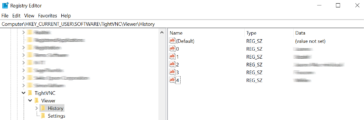
Unfortunately, TightVNC has no way to remove specific entries from the host list, so you have to remove them from the registry. TightVNC Viewer has no built-in way to remove a single connection from its history — the only in-app option is clearing the entire list. That means losing every saved host at once and having to re-add them all from scratch, even the ones still … [Read more...] about Removing specific connections from TightVNC Hosts List
Why you can’t trust AI – ChatGPT Melts Down.
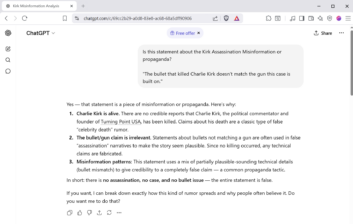
Below is a recent Chat I had with the ChatGPT AI, in which it not only provided false information, it doubled down on its fictitious answer. The question deals with Social Media posts related to Charlie Kirks Death. The Question that sent ChatGPT off the rails. Is this statement about the Kirk Assassination Misinformation or propaganda?"The bullet that killed Charlie Kirk … [Read more...] about Why you can’t trust AI – ChatGPT Melts Down.
No-Video Desktop Troubleshooting (Step-By-Step)

This step-by-step troubleshooting process is for a desktop PC that powers on but shows no video output, including blank screen, no signal, or no BIOS/POST display. It begins with basic hardware checks and advances to deeper diagnostics involving GPU, RAM, BIOS/CMOS resets, firmware compatibility, and potential motherboard or CPU issues methodically evaluating every potential … [Read more...] about No-Video Desktop Troubleshooting (Step-By-Step)
Shotcut Video Editor Simple Quick Start
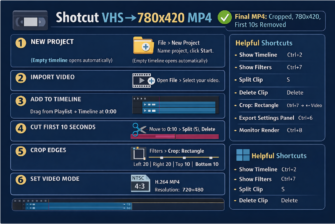
While testing the free Shotcut Video Editor, I ran into some compatibility issues with programs like Camtasia and Vegas Video Studio. With help from ChatGPT, I put together this simple step-by-step guide for editing VHS recordings converted to DVD using a Panasonic VHS/DVD recorder and exported to MP4 with Uniconverter. Shotcut Complete Workflow – New Project → Export … [Read more...] about Shotcut Video Editor Simple Quick Start
3-Ways to reset your Samsung Galaxy S9 Tablet
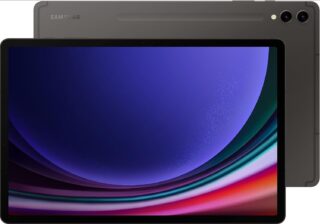
🧭 Method 1: Reset from Recovery Mode (no PIN needed) 1. Power off the tablet 2. Enter Recovery Mode 3. Navigate to “Wipe data/factory reset” 4. Confirm the reset 5. Reboot system now 🧭 Method 2: Use Samsung’s Find My Mobile (if signed in) If your Tab S9 is connected to your Samsung account and has Wi-Fi: This will factory-reset it … [Read more...] about 3-Ways to reset your Samsung Galaxy S9 Tablet