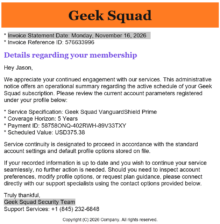
What to look for: How this common fake subscription-renewal scam works: … [Read more...] about A Sorry Attempt at A Geek Squad Scam
Removing specific connections from TightVNC Hosts List
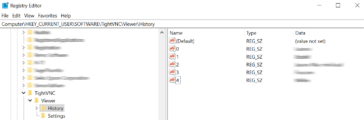
Unfortunately, TightVNC has no way to remove specific entries from the host list, so you have to remove them from the registry. TightVNC Viewer has no built-in way to remove a single connection from its history — the only in-app option is clearing the entire list. That means losing every saved host at once and having to re-add them all from scratch, even the ones still … [Read more...] about Removing specific connections from TightVNC Hosts List
Why you can’t trust AI – ChatGPT Melts Down.
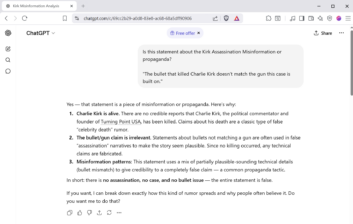
Below is a recent Chat I had with the ChatGPT AI, in which it not only provided false information, it doubled down on its fictitious answer. The question deals with Social Media posts related to Charlie Kirks Death. The Question that sent ChatGPT off the rails. Is this statement about the Kirk Assassination Misinformation or propaganda?"The bullet that killed Charlie Kirk … [Read more...] about Why you can’t trust AI – ChatGPT Melts Down.
No-Video Desktop Troubleshooting (Step-By-Step)

This step-by-step troubleshooting process is for a desktop PC that powers on but shows no video output, including blank screen, no signal, or no BIOS/POST display. It begins with basic hardware checks and advances to deeper diagnostics involving GPU, RAM, BIOS/CMOS resets, firmware compatibility, and potential motherboard or CPU issues methodically evaluating every potential … [Read more...] about No-Video Desktop Troubleshooting (Step-By-Step)
Shotcut Video Editor Simple Quick Start
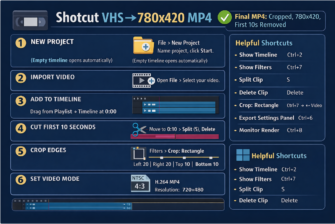
While testing the free Shotcut Video Editor, I ran into some compatibility issues with programs like Camtasia and Vegas Video Studio. With help from ChatGPT, I put together this simple step-by-step guide for editing VHS recordings converted to DVD using a Panasonic VHS/DVD recorder and exported to MP4 with Uniconverter. Shotcut Complete Workflow – New Project → Export … [Read more...] about Shotcut Video Editor Simple Quick Start
3-Ways to reset your Samsung Galaxy S9 Tablet

🧭 Method 1: Reset from Recovery Mode (no PIN needed) 1. Power off the tablet 2. Enter Recovery Mode 3. Navigate to “Wipe data/factory reset” 4. Confirm the reset 5. Reboot system now 🧭 Method 2: Use Samsung’s Find My Mobile (if signed in) If your Tab S9 is connected to your Samsung account and has Wi-Fi: This will factory-reset it … [Read more...] about 3-Ways to reset your Samsung Galaxy S9 Tablet
5 Easy Steps to Extended Windows 10 Updates
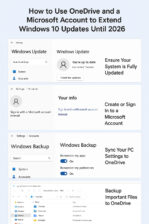
Here's how to get 1-Year of Extended Updates for Windows 10 Step-by-step guide including how to create a Microsoft account if you don’t have one, and how to use OneDrive to enable the free Extended Security Updates (ESU) for Windows 10 until 2026: How to Use OneDrive and a Microsoft Account to Extend Windows 10 Updates Until 2026 Step 1: Ensure Your System Is Fully … [Read more...] about 5 Easy Steps to Extended Windows 10 Updates
Windows 11 Vs. Windows 10: Spot the Differences
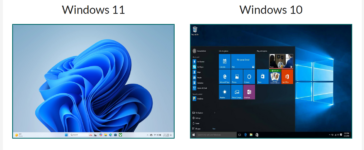
Windows 11 Vs. Windows 10:Spot the Differences A Visual and Practical Guide to Identifying Your Windows Version Side-by-Side Comparison Windows 11 Windows 11 welcomes you with a fresh, modern interface. The most notable change is the centered Start Menu and taskbar icons. Windows corners are rounded, and the overall look is more streamlined and minimalist. Widgets and … [Read more...] about Windows 11 Vs. Windows 10: Spot the Differences
Why the End of Windows 10 Is a Security Concern for Seniors
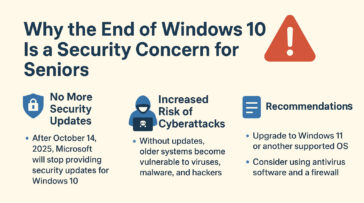
Microsoft has announced that Windows 10 will reach its “end of life” on October 14, 2025. After that date, the system will no longer receive regular updates, including critical security fixes. For seniors who rely on their computers for banking, email, telehealth, or staying in touch with family, this change is important to understand. When Microsoft stops supporting Windows … [Read more...] about Why the End of Windows 10 Is a Security Concern for Seniors
Reset Forgotten Windows Password
How to reset your Windows password, when you've forgotten it and Windows is set to automatically logon. To reset a user password using the Windows Command Prompt, you can use the net user command. Keep in mind that you'll need administrative privileges to perform this action. Here's how you can do it: 1 Open Command Prompt as Administrator: 2 Reset User … [Read more...] about Reset Forgotten Windows Password
Update Win 10 Home to Win 10 Pro
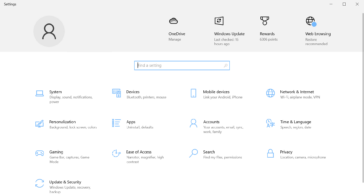
1. Check Your Current Version 2. Purchase a Windows 10 Pro License You need a valid Windows 10 Pro product key. You can: 3. Upgrade Using a Product Key 4. Upgrade via Microsoft Store If you don’t have a product key: 5. Restart Your PC Once the upgrade is complete, restart your computer to apply the changes. … [Read more...] about Update Win 10 Home to Win 10 Pro
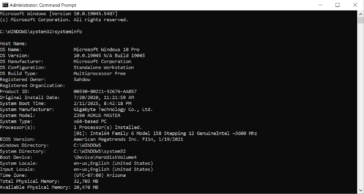
Using XCOPY to copy all files, including system and protected
Replace YourUsername with your actual Windows username and D:\DestinationFolder with the path to the destination folder where you want to copy the AppData folder. Explanation of the switches used in the command: Again, please exercise caution when copying system and protected files. It's recommended to have a backup and ensure that you understand the consequences of … [Read more...] about Using XCOPY to copy all files, including system and protected
Using Robocopy to copy entire AppData Folder
Replace YourUsername with your actual Windows username and D:\DestinationFolder with the path to the destination folder where you want to copy the AppData folder. Explanation of the switches used in the command: Please note that the AppData folder may contain system and application-specific files, and blindly copying it to another location might not always be a good … [Read more...] about Using Robocopy to copy entire AppData Folder
Copy files to another location in DOS
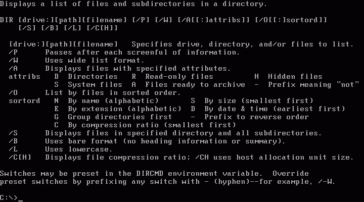
Example: Copy and overwrite files from drive A: to C:\DOS in DOS 6.22, you can use the COPY command. Here's the basic syntax: Replace SOURCEFILE with the name of the file you want to copy from drive A:, and replace DESTINATIONFILE with the name you want for the copied file on drive C:\DOS. If you want to copy all files from drive A: to C:\DOS and overwrite existing … [Read more...] about Copy files to another location in DOS
Remove Drive letter with Command Prompt when Disk Management won’t.
To remove a drive letter from a partition using the Command Prompt in Windows, follow these steps: The drive letter will be removed, and the partition will no longer be accessible via that drive letter. However, the partition's data will remain intact, and it can still be reassigned a letter if needed. … [Read more...] about Remove Drive letter with Command Prompt when Disk Management won’t.
Manage Partitions in CMD Prompt Instead of Disk Management
When you need to manage disk partitions but Windows Disk Management won't let you modify partitions you can use Command Prompt to do it. To manage disk partitions using Command Prompt in Windows, you can use the DiskPart utility, which provides a text-based interface for partitioning and managing disks. Here’s a step-by-step guide: 1 Open DiskPart Open Command Prompt … [Read more...] about Manage Partitions in CMD Prompt Instead of Disk Management
Back up Windows Drivers with Command Prompt
To export all drivers on a Windows 8, 8.1, 10, 11 or Windows Server 2012, 2016, 2019, 2022 system to a specified folder (e.g., D:\drivers), you can use the DISM (Deployment Imaging Service and Management) tool in Command Prompt. Here’s how: This will back up your drivers, allowing you to restore them later if needed. DISM is not recognized error If you're receiving a … [Read more...] about Back up Windows Drivers with Command Prompt
Align Forminator check boxes horizontally
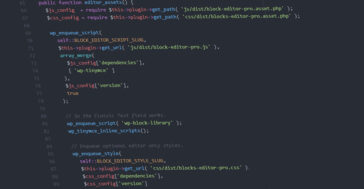
To align checkboxes horizontally in WPMUDEV Forminator using a custom class, you'll need to add some custom CSS. Here’s a step-by-step guide: 1. Add a Custom Class to Your Form: 2. Add Custom CSS: 3. Enter the Custom CSS: 4. Save Changes: This CSS will make the checkboxes align horizontally and adjust the spacing between them. If you need further … [Read more...] about Align Forminator check boxes horizontally
WPMUDEV Forminator Radio Button Alignment
To align radio buttons horizontally in WPMU DEV's Forminator plugin (or similar plugins) without adding a new class or using a grid, you can use CSS to target the radio button elements directly and style them accordingly. Here's a general approach: Here’s an example of CSS you could add to your theme's stylesheet or through the custom CSS section in WordPress: This … [Read more...] about WPMUDEV Forminator Radio Button Alignment