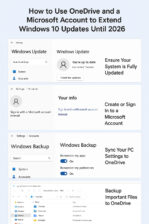
Here's how to get 1-Year of Extended Updates for Windows 10 Step-by-step guide including how to create a Microsoft account if you don’t have one, and how to use OneDrive to enable the free Extended Security Updates (ESU) for Windows 10 until 2026: How to Use OneDrive and a Microsoft Account to Extend Windows 10 Updates Until 2026 Step 1: Ensure Your System Is Fully … [Read more...] about 5 Easy Steps to Extended Windows 10 Updates
Windows
Windows 11 Vs. Windows 10: Spot the Differences
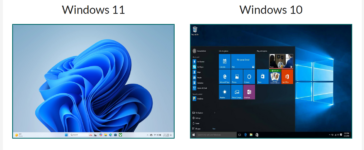
Windows 11 Vs. Windows 10:Spot the Differences A Visual and Practical Guide to Identifying Your Windows Version Side-by-Side Comparison Windows 11 Windows 11 welcomes you with a fresh, modern interface. The most notable change is the centered Start Menu and taskbar icons. Windows corners are rounded, and the overall look is more streamlined and minimalist. Widgets and … [Read more...] about Windows 11 Vs. Windows 10: Spot the Differences
Why the End of Windows 10 Is a Security Concern for Seniors
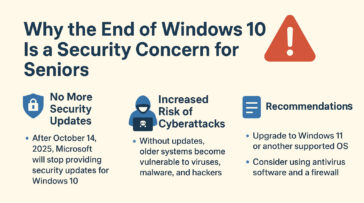
Microsoft has announced that Windows 10 will reach its “end of life” on October 14, 2025. After that date, the system will no longer receive regular updates, including critical security fixes. For seniors who rely on their computers for banking, email, telehealth, or staying in touch with family, this change is important to understand. When Microsoft stops supporting Windows … [Read more...] about Why the End of Windows 10 Is a Security Concern for Seniors
Reset Forgotten Windows Password
How to reset your Windows password, when you've forgotten it and Windows is set to automatically logon. To reset a user password using the Windows Command Prompt, you can use the net user command. Keep in mind that you'll need administrative privileges to perform this action. Here's how you can do it: 1 Open Command Prompt as Administrator: 2 Reset User … [Read more...] about Reset Forgotten Windows Password
Update Win 10 Home to Win 10 Pro
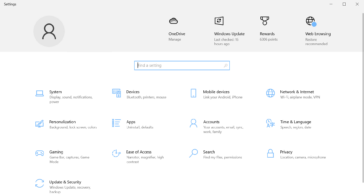
1. Check Your Current Version 2. Purchase a Windows 10 Pro License You need a valid Windows 10 Pro product key. You can: 3. Upgrade Using a Product Key 4. Upgrade via Microsoft Store If you don’t have a product key: 5. Restart Your PC Once the upgrade is complete, restart your computer to apply the changes. … [Read more...] about Update Win 10 Home to Win 10 Pro
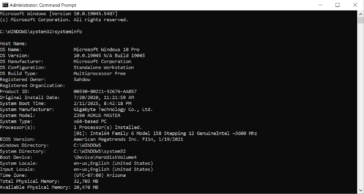
Using XCOPY to copy all files, including system and protected
Replace YourUsername with your actual Windows username and D:\DestinationFolder with the path to the destination folder where you want to copy the AppData folder. Explanation of the switches used in the command: Again, please exercise caution when copying system and protected files. It's recommended to have a backup and ensure that you understand the consequences of … [Read more...] about Using XCOPY to copy all files, including system and protected
Using Robocopy to copy entire AppData Folder
Replace YourUsername with your actual Windows username and D:\DestinationFolder with the path to the destination folder where you want to copy the AppData folder. Explanation of the switches used in the command: Please note that the AppData folder may contain system and application-specific files, and blindly copying it to another location might not always be a good … [Read more...] about Using Robocopy to copy entire AppData Folder
Remove Drive letter with Command Prompt when Disk Management won’t.
To remove a drive letter from a partition using the Command Prompt in Windows, follow these steps: The drive letter will be removed, and the partition will no longer be accessible via that drive letter. However, the partition's data will remain intact, and it can still be reassigned a letter if needed. … [Read more...] about Remove Drive letter with Command Prompt when Disk Management won’t.
Manage Partitions in CMD Prompt Instead of Disk Management
When you need to manage disk partitions but Windows Disk Management won't let you modify partitions you can use Command Prompt to do it. To manage disk partitions using Command Prompt in Windows, you can use the DiskPart utility, which provides a text-based interface for partitioning and managing disks. Here’s a step-by-step guide: 1 Open DiskPart Open Command Prompt … [Read more...] about Manage Partitions in CMD Prompt Instead of Disk Management
Back up Windows Drivers with Command Prompt
To export all drivers on a Windows 8, 8.1, 10, 11 or Windows Server 2012, 2016, 2019, 2022 system to a specified folder (e.g., D:\drivers), you can use the DISM (Deployment Imaging Service and Management) tool in Command Prompt. Here’s how: This will back up your drivers, allowing you to restore them later if needed. DISM is not recognized error If you're receiving a … [Read more...] about Back up Windows Drivers with Command Prompt
Be Patient With Windows 10 Fall Creators Update
I've had a number of client's contact me recently about poor performance on their Windows 10 Machines. Most of them were concerned that they needed a new computer or there was something wrong with their computer; in each case, the issue was simply one of being patient. The Fall Creators Update isn't just a few patches it contains some major updates and as such takes a while … [Read more...] about Be Patient With Windows 10 Fall Creators Update
Microsoft Ending Windows Vista Mainstream Support on Tuesday
Still using Vista? Now is the time to upgrade to another operating system. On Tuesday, Microsoft will end "Mainstream Support" for Windows Vista, moving into an "Extended Support" phase that lasts through April 11, 2017.Source: Microsoft Ending Windows Vista Mainstream Support on Tuesday | PCWorld If your PC can run Win 10, it's the way to go for people who want to or … [Read more...] about Microsoft Ending Windows Vista Mainstream Support on Tuesday
Win 10 Upgrade Is Free If You Have Windows 7 or 8
I went to download the latest technical preview build of Windows 10 yesterday and discovered it's already been released! The great thing about Windows 10 is it's free for the life of the product (as long as they continue to update it) if you have Windows 7 or Windows 8. But there is a catch, you have to upgrade within 1 year of the Windows 10 release. After that … [Read more...] about Win 10 Upgrade Is Free If You Have Windows 7 or 8